In an era defined by digital transformation, it is easy to assume that physical records have become a secondary concern. However, for government agencies, healthcare systems, and legal firms, the physical file remains a critical “source of truth.” The challenge facing these organizations is not the existence of paper, but the inefficiency of traditional filing methods.
Poorly designed filing systems are more than just an organizational nuisance; they are a direct drain on productivity and a risk to compliance. When someone misplaces a file, the search cost ripples through the organization—delaying legal proceedings, impacting patient care, or stalling public services. At TrackerIoT, we believe the solution lies in a hybrid approach: combining the visual intelligence of color-coded filing systems with the digital precision of IoTFileTracker.
What Is a Color-Coded Filing System?
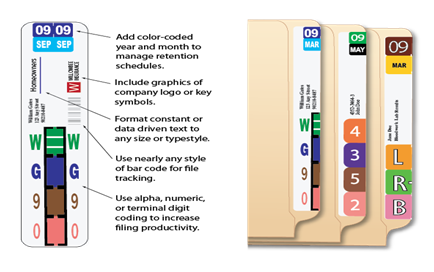
Color-coded filing systems use a records management methodology that assigns a unique, standardized color to each digit (0–9) or letter of the alphabet (A–Z). These colors appear as solid bands on the visible tab of a file folder. When you arrange folders in sequence on a shelf, these colors stack together to form a continuous, unbroken bar—like a visual barcode running across your filing units.
The logic is elegant: if a user places a folder out of sequence—misindexing or misfiling it—the mistake breaks the color bar with a jarring visual clash. Rather than reading individual labels one by one, records staff simply scan the shelf to find the inconsistency. A single glance replaces minutes of laborious searching.
Organizations have relied on color coded filing for decades, but in today’s compliance-driven environment—where legal discovery deadlines, HIPAA audits, and public records requests demand instant file access—combining this proven visual system with digital tracking technology has become a competitive and regulatory necessity.
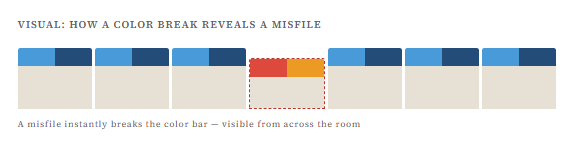
This is the essential power of color-coded file folders: the error announces itself. In a traditional manila-folder filing room, a misfile is invisible until someone goes actively looking for that specific document. With color coding, errors are self-revealing and continuously monitored—every time someone walks past the shelf.
The Science Behind Color Coding: Why It Works
Cognitive science grounds color-coded filing systems, proving they are more than just a convention. The human visual system processes color and pattern recognition far faster than it processes written language. Reading a label requires the brain to engage its language-processing centers, which are slower and more fatigue-prone. The brain’s visual cortex handles color pattern recognition, operating at near-instantaneous speed.
Visual Processing vs. Cognitive Processing
In a standard filing environment, a clerk must approach a shelf, bring their eyes close to individual tabs, and read small text—often in varying handwriting or print sizes. This process is slow, straining, and error-prone, especially over long shifts or in poor lighting. A color coded filing system replaces this “read-every-label” task with a “scan-the-pattern” task.
From across the aisle – often 8 to 10 feet away – a trained records clerk can identify the approximate location of a file group by its color sequence. They don’t navigate to a shelf; they navigate to a color zone. This reduces the average retrieval cycle dramatically, and reduces cognitive fatigue that leads to downstream misfiling.
Error Detection Built into the System
Perhaps the most underappreciated benefit is passive error detection. In a traditional system, the physical organization of the room degrades silently over months. Misfiles accumulate invisibly. With color coding, every misfile is a visible anomaly—a “color clash” that stands out against the uniform pattern like a wrong note in a melody. Staff don’t have to conduct audits to find errors; the errors declare themselves continuously.
💡 Best Practice Insight
Research in human factors engineering has long confirmed that color-coded signaling systems reduce error rates in high-volume repetitive tasks. In records management specifically, transitioning from a plain-text system to a color coded filing system has been documented to reduce misfiling rates by as much as 90%.

How Color Coding Eliminates Misfiles in Real Time
Misfiling is the single greatest threat to operational efficiency in physical records management. When staff misplace a file, they functionally lose it—rendering it unavailable for the patient consultation, the legal hearing, or the government service request that depends on it. The downstream costs are significant: staff waste labor searching for it, the organization faces regulatory exposure if it cannot produce the file, and healthcare providers risk potential patient safety issues.
The Traditional Misfiling Problem
In a standard filing system, a misfiled document is invisible until someone goes looking for it. By then, hours or days may have passed. Large organizations may need to reconstruct the file from scratch—a process that can cost thousands of dollars annually per individual misfiled record when they total legal, administrative, and staff-time costs.
Color Coding as a Continuous Audit
With color coded filing systems, every interaction with the filing room becomes a passive quality check. Each time a records manager, clerk, or auditor walks down an aisle, their eyes are automatically scanning for color breaks. No formal audit is required to maintain quality. The system is self-monitoring.
When the system identifies a color clash, you can correct it in seconds—saving the hours it takes to search for a lost file by name in a text-based system. The cost of correction is minimal; the cost of avoidance of the error is massive.
Compliance and Audit Trail Support
For organizations subject to regulatory oversight—whether HIPAA, GDPR, legal discovery rules, or government records retention laws – the ability to demonstrate physical filing accuracy is part of a credible compliance posture. Color coded filing for compliance creates a visual audit trail that reinforces the digital audit trail maintained by systems like IoTFileTracker.
⚠ Compliance Risk
An audit trail in a digital system is only as credible as the physical accuracy of the records room. If IoTFileTracker indicates a file is on Shelf 7B but that file is misfiled on Shelf 12A, both the digital and physical systems fail. Color coding closes this gap by making physical accuracy self-maintaining.
File Folder Indexing Best Practices
The effectiveness of any color coded filing system depends entirely on the quality and consistency of its indexing schema. Without a standardized approach to file folder indexing, inconsistent labeling, duplicate entries, and conflicting filing rules undermine the visual benefits of color coding.
Choosing Your Index Type
There are three common indexing approaches for color coded systems:
- Alphabetic indexing: The system assigns a color to each letter of the last name (or organization name). Best for patient files, client records, and legal matters. Each two-letter combination creates a unique color pair visible on the tab.
- Numeric indexing: Each digit 0–9 is assigned a color. Ideal for account numbers, case numbers, insurance policy IDs, and government record numbers. Numeric systems are inherently scalable and less subject to name-change complications.
- Alphanumeric indexing: A hybrid approach combining letter and number colors. Common in environments with both name-based and number-based identifiers.
The Critical Role of Standardization
Whatever schema is chosen, absolute standardization across the organization is non-negotiable. If one department files under “Last Name, First” and another files under “First Name Last Name,” the color coding system breaks down at the departmental boundary. All indexing rules must be documented, trained on, and enforced uniformly.
IoTFileTracker enforces this standardization at the digital level. When the system registers a new file, it validates the physical label against the database record. If the physical label doesn’t match the digital registration, the system flags the discrepancy before anyone places the file on the shelf. This prevents ghost records and duplicate files before users create them.
| Factor | Alphabetic Index | Numeric Index | Alphanumeric Index |
|---|---|---|---|
| Best for | Patient/client names | Account/case numbers | Mixed environments |
| Scale easily? | ✗ Name collisions | ✓ Highly scalable | ✓ Moderate |
| Handles name changes? | ✗ Requires re-filing | ✓ ID unchanged | ✓ ID unchanged |
| Ease of training | High (intuitive) | Medium | Lower |
| Color combinations needed | 26 letter colors | 10 digit colors | Up to 36 colors |
Side-Tab vs. Top-Tab: Which Should You Use?
The physical orientation of your folder tabs is not merely a matter of aesthetic preference—it has a direct, measurable impact on retrieval speed, staff ergonomics, and storage density.
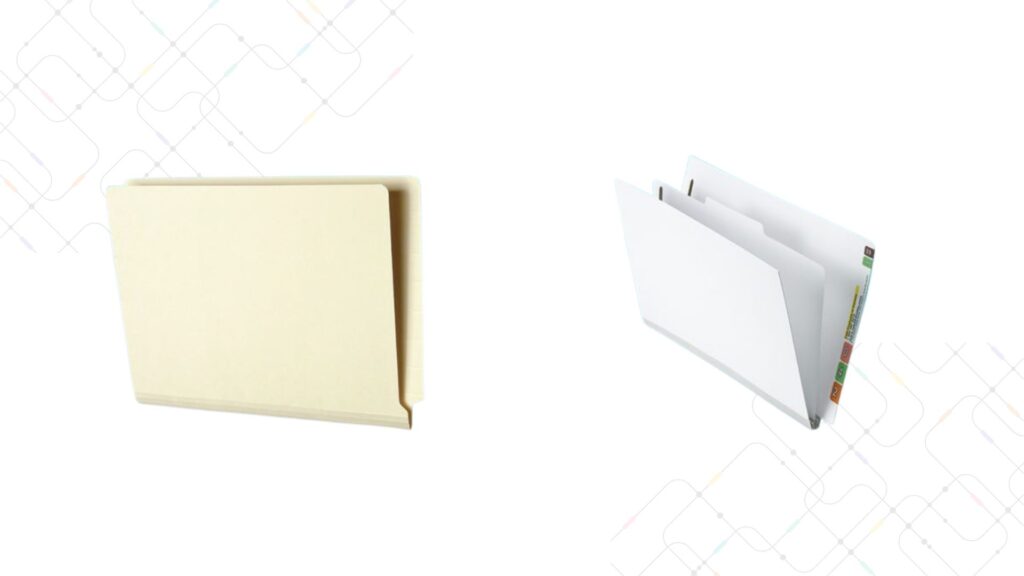
Side-Tab (End-Tab) Color Coded Folders – The Gold Standard
Side-tab folders display their color-coded index on the vertical edge of the folder. When folders are standing upright on open shelving, every single tab is simultaneously visible from the front of the shelf. A records clerk walking down the aisle can read an entire row of hundreds of files in a single scan.
Most experts widely regard side-tab filing combined with open-shelf storage as the gold standard for physical records management. It maximizes visual access, minimizes retrieval time, eliminates the need to open drawers, and enables the color-bar effect that makes misfiling immediately visible.
Top-Tab Color Coded Folders – When to Use Them
Top-tab folders display their index on the top horizontal edge. This design is native to traditional lateral and vertical file drawers, where drawers open outward and folders hang in suspension. While color coding is still possible with top-tab systems, the drawers hide the tabs behind the drawer edge when closed, eliminating the passive color-monitoring benefit.
Top-tab systems are appropriate only when physical space constraints make open-shelf storage genuinely impossible—such as in retrofitted offices with low ceilings or specific architectural limitations. In all other cases, transitioning to side-tab open-shelf is strongly recommended.
💡 Space Planning Tip
Organizations that convert from traditional drawer cabinets to open-shelf side-tab systems consistently report up to 50% more storage capacity in the same floor footprint, thanks to the elimination of drawer clearance space. This alone can defer or eliminate expensive off-site storage costs.
Color Coded Filing and Open-Shelf Storage: A Perfect Partnership
To realize the full potential of a color-coded filing system, you must design the physical environment to support it.. Open-shelf filing units—whether standard static shelving or high-density mobile shelving systems—are the natural partner for color coded side-tab folders.
Space Utilization Advantages
Open shelving units use 100% of their vertical height for filing, limited only by safe reach height for staff. Traditional file cabinets dedicate significant “dead space” to drawer mechanisms and required clearance in front of each drawer. Converting a records room from drawers to open shelving can increase filing capacity by 40–50% in the same square footage, or alternatively allow a significant reduction in the records room’s floor footprint.
Ergonomic and Operational Benefits
Open shelving eliminates the physical strain associated with heavy drawer operation. For records staff who retrieve and re-file dozens or hundreds of documents per day, this reduction in repetitive physical effort has real impact on workplace health and staff productivity.
Re-filing in a color coded open-shelf environment is also dramatically faster. Instead of opening the correct drawer, locating the approximate alphabetical or numerical position, and inserting the folder, the staff member simply matches the color sequence on the folder tab to the sequence on the shelf and slots the file in. The color pattern confirms the correct location before you ever place the folder.
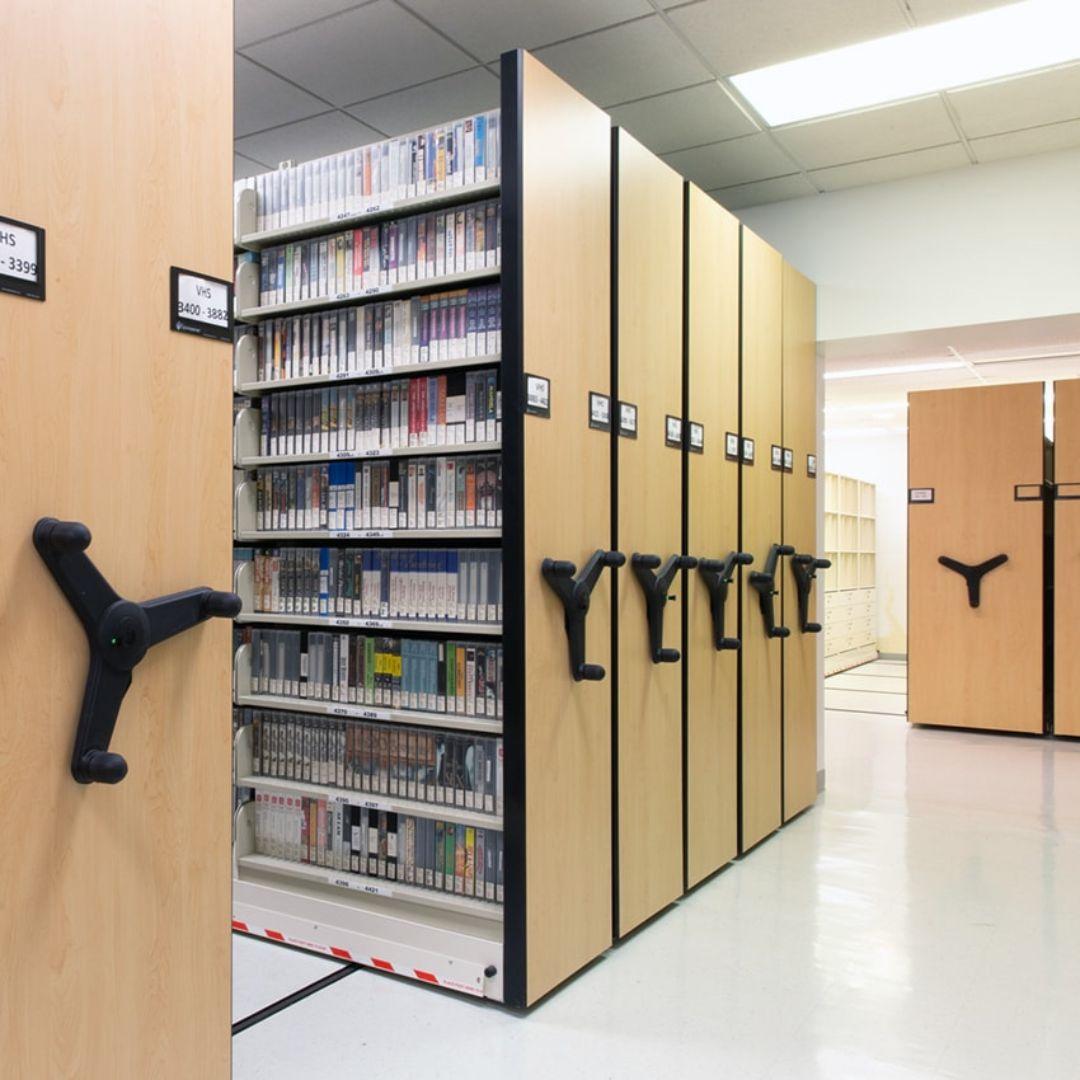
High-Density Mobile Shelving
For maximum density, high-density mobile shelving systems—in which multiple rows of shelving share a single aisle via a rolling mechanism—can combine open-shelf color coded filing with extreme space efficiency, sometimes exceeding 200% of standard shelving capacity. These systems are increasingly common in government archives, hospital health information departments, and large corporate records centers.
Managing Files in Circulation with Color Coding
One of the most overlooked challenges in physical records management is tracking files that are not on the shelf—files currently checked out to staff, temporarily placed on a desk, or in transit between departments. Even the most sophisticated RFID file tracking system can tell you that a file is “somewhere in the building.” Color coding tells you which file it is the moment you pick it up.
In a busy department, temporary “staging areas”—inbox trays, review piles, or clerk desks—accumulate files from multiple folders. Without color coding, these files are indistinguishable from one another in terms of their proper location. With color coding, a clerk can sort an entire pile of circulating files back to their correct shelf locations in minutes, simply by reading the color tabs and matching them to the shelf sequence.
This is the elegant bridge that color coding provides: RFID and digital systems give you macro-level location visibility (which department, which building), while color coding provides micro-level physical handling precision (which shelf, which file, right now). The two systems are complementary, not redundant.
How IoTFileTracker Supercharges Color Coded Filing Systems
IoTFileTracker is designed as a digital force multiplier for your physical filing system—not a replacement for it. The platform provides what color coding alone cannot: automated chain-of-custody tracking, real-time digital location visibility, access control, and compliance-grade audit reporting.
RFID-Powered Digital Location Tracking
Each file registered in IoTFileTracker is tagged with an RFID chip that communicates with sensors positioned at key points throughout the facility—doorways, department entrances, records room ingress/egress points. As a file moves through the building, the system automatically updates its digital location in real time.
The system records who checked the file out, when it left the records room, which path it took through the building, and when it is expected to be returned. This creates a complete, tamper-evident chain of custody for every physical record in the organization.
Redundant Error Detection: Digital + Physical
When IoTFileTracker and color coded filing operate in parallel, you have two independent layers of error detection. If the digital system indicates a file should be on Shelf 7B, but the color sequence on Shelf 7B shows no gap, the records manager knows immediately to check circulation—the file has been moved. Conversely, if a color clash appears on Shelf 7B but the digital system shows no checked-out files in that section, a data entry discrepancy is flagged instantly.
This dual-layer redundancy makes it virtually impossible for a file to become truly “lost.” It either appears in the digital record, or it appears as a visual absence on the color-coded shelf—and usually both signals are present simultaneously.
Automated Compliance and Audit Reporting
IoTFileTracker generates automated audit reports that can be produced on demand for regulatory inspections, legal discovery requests, or internal quality reviews. These reports document every file movement, every checkout event, and every access by every user. Combined with the visual accuracy maintained by color coding, the result is a compliance posture that is defensible, consistent, and audit-ready at all times.
| Capability | Color Coding Alone | Color Coding + IoTFileTracker |
|---|---|---|
| Misfiling detection on shelf | ✓ Instant visual | ✓ Visual + digital alert |
| Track file in circulation | ✗ Manual log only | ✓ Automated real-time |
| Chain of custody record | ✗ Not automated | ✓ Tamper-evident log |
| Compliance audit reports | ✗ Manual compilation | ✓ Automated on demand |
| Access control & permissions | ✗ None | ✓ Role-based control |
| Overdue file alerts | ✗ None | ✓ Automated notifications |
| Visual retrieval speed | ✓ Color bar scanning | ✓ Color bar + digital map |
Industries That Benefit Most from Color Coded Filing Systems

Healthcare & Patient Records
Missing or misfiled patient charts create direct safety risks and HIPAA liability. Color coded systems ensure clinicians can access records at the point of care, while IoTFileTracker maintains HIPAA-compliant chain of custody.

Legal & Law Firms
Legal discovery deadlines are non-negotiable. Color coded filing gives law firms immediate retrieval capability for original contracts, deposition materials, and case files – backed by a digital audit trail that documents chain of custody.
Government & Public Records
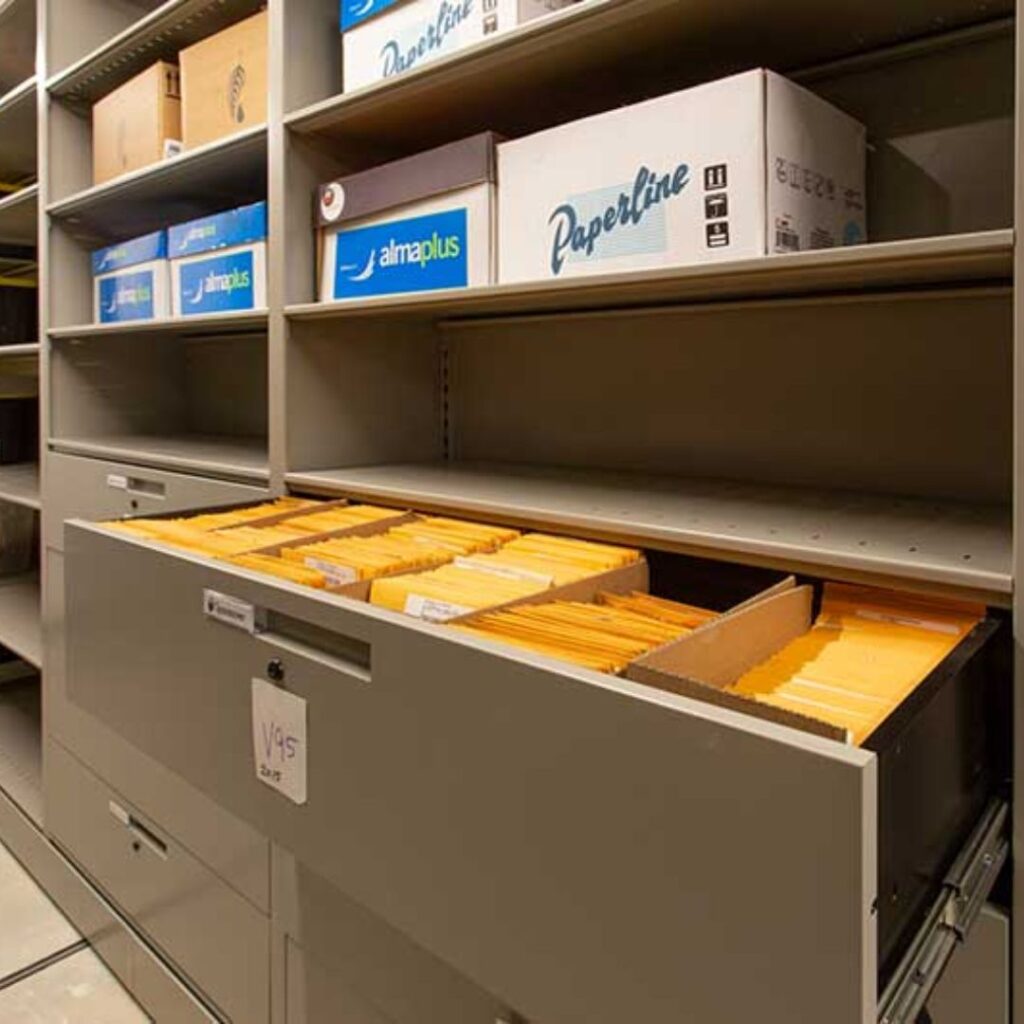
Government agencies managing millions of historical documents rely on color coding for scalable, accurate physical organization. Public records requests and FOIA obligations demand rapid, verifiable file retrieval.

Banking & Financial Services
Loan files, account documents, and regulatory correspondence require precise organization. Color coded systems reduce processing errors and support financial audit requirements with a visible, verifiable filing structure.
Corporate Records Centers
HR files, contracts, and compliance documents managed at enterprise scale benefit enormously from color coding. Staff turnover is less disruptive when the filing system is intuitive and self-correcting.
Education & Student Records
Student academic records, enrollment files, and financial aid documents benefit from color coded filing’s combination of retrieval speed and FERPA-compliant access control when paired with IoTFileTracker.
The Three-Pillar Best-in-Class Records Management Model
The highest-performing records management environments—those that routinely survive regulatory audits, meet rapid discovery deadlines, and operate with minimal staff overhead—share a common structure. They combine three mutually reinforcing systems into a single, integrated approach.
Color Coded Filing Systems – Human-Speed Retrieval
Provides visual intelligence for rapid physical retrieval and continuous, passive error detection. Turns a wall of folders into an intuitive, scannable map. Enables any trained staff member to locate and re-file records accurately, even under time pressure.
Open-Shelf Filing – Space Optimization & Ergonomic Access
Pairs with color coding to maximize visual access and filing density. Eliminates drawer-related delays, reduces physical strain, and can increase storage capacity by 40–50% in the same footprint. A prerequisite for full color-bar visibility.
IoTFileTracker (RFID) – Digital Tracking, Security & Auditability
Provides real-time digital location data, automated chain-of-custody logging, access control, and compliance-grade audit reporting. Acts as the digital brain overlaying the physical intelligence provided by color coding and open-shelf organization.
Organizations that implement all three pillars together achieve what might be called “total file management visibility”—a state in which no record can be lost, every movement is documented, every error is self-revealing, and every audit is ready before it begins.
Step-by-Step Implementation Guide for Color Coded Filing Systems
Transitioning to a color coded filing system is a structured project that requires careful planning but delivers rapid, measurable returns. Here is a practical implementation roadmap.
Step 1: Conduct a Records Inventory and Audit
Before any physical changes, document what you have. Count total active files, understand your primary filing index (alphabetic vs. numeric), identify the volume by category, and assess your current physical infrastructure (shelving type, room layout, aisle configuration). This baseline determines the scope of your transition and helps you size your color folder order accurately.
Step 2: Define Your Indexing Schema
Choose your index type (alphabetic, numeric, or alphanumeric) based on your primary identifier. Document the schema precisely and have it reviewed by all department heads who will interact with the filing system. Standardize now, before folders are ordered. Changes after implementation are expensive.
Step 3: Select Your Color Coding System
Color coding systems are standardized by major filing suppliers; most use consistent color assignments for letters and digits across their product lines. Selecting a supplier whose color scheme is well-established prevents vendor lock-in and ensures that staff trained in one color system can work productively with standard products industry-wide.
Step 4: Upgrade to Open-Shelf Filing Units
If your current infrastructure relies on file drawer cabinets, this is the time to plan your conversion to open-shelf or high-density mobile shelving. This step is often the most significant capital investment of the project, but it yields the highest return in space savings and operational efficiency. IoTFileTracker’s team can assist with shelving layout planning.
Step 5: Integrate IoTFileTracker
Register all files in IoTFileTracker before they are physically re-filed. Apply RFID tags during the transition. Configure checkout workflows, user permissions, and sensor positions for your facility. Establish baseline audit reports so you have a clean starting point for compliance tracking.
Step 6: Train Staff Thoroughly
Color coded filing is intuitive, but standardized training is essential. All staff who interact with the files—not just records managers—should receive training on the color schema, the checkout process in IoTFileTracker, and the protocols for reporting color clashes or missing files. Training is the most important factor in sustaining the system’s accuracy over time.
Step 7: Establish Ongoing Quality Review
Implement a regular (monthly or quarterly) audit process using IoTFileTracker’s automated reports. Compare digital inventory against physical shelf checks. Track misfiling rates over time as a quality metric. Organizations that measure this consistently find that errors continue to decline over the first 12–18 months as staff become fully fluent in the system.
Conclusion
In a world that increasingly assumes digital-first workflows, physical records management remains a critical operational function for a wide range of organizations. Healthcare systems, legal firms, government agencies, and financial institutions all depend on the integrity and accessibility of original physical documents—documents that cannot be lost, misfiled, or inaccessible at the moment they are needed.
Color coded filing systems represent the most proven, practical, and effective approach to managing physical records at scale. They leverage fundamental principles of human visual processing to reduce error, accelerate retrieval, and make quality control continuous and self-maintaining. When combined with open-shelf storage infrastructure and digital tracking via IoTFileTracker’s RFID platform, the result is a records environment that achieves total file management visibility.
Files cannot be lost. Errors are self-revealing. Audits are always ready. Compliance is maintained automatically. And staff can manage larger volumes of records with less time, less effort, and fewer mistakes.
TrackerIoT has been helping organizations design and implement best-in-class records management solutions since 1984. Whether you are beginning your first color coding project or looking to enhance an existing system with RFID tracking capabilities, our team brings decades of experience across thousands of client implementations.