In the sophisticated landscape of records management, achieving Total File Management Visibility begins at a single, critical point: the label. A label is not merely an identifier; it is the digital handshake between a physical asset and the intelligence of the IoTFileTracker software platform. Whether you are managing active legal folios, government dossiers, or dense archives, the quality and accuracy of your labeling determine the efficiency of your entire document lifecycle.
At IoTFileTracker, we provide a mature, COTS (commercial-off-the-shelf) solution that transforms labeling from a clerical task. Our platform converts labeling into a high-performance data entry and tracking engine for efficient records management. By integrating robust label printing capabilities directly into the system, it registers every document, file folder, and archive box. This ensures all files are searchable, organized, and “audit-ready” immediately upon creation
Intelligent Data Entry and Records Integration
The strength of the IoTFileTracker labeling system lies in its flexibility. To generate a record and its corresponding label, the software platform supports multiple methods of data acquisition:
- Direct Data Entry: Staff can utilize the intuitive graphical user interface to enter record details via keyboard. With built-in data precision tools like drop-down lists and date pickers, the software prevents the manual errors common in decentralized spreadsheets.
- Backend Database Integration: For organizations with existing systems, IoTFileTracker can import records directly from a customer’s backend database. This synchronization aligns your physical file labels perfectly with your enterprise’s digital records.
Once a record is established, the software automatically triggers the label printing process, ensuring that no file enters circulation without a digital identity.
Tailored Labeling for Every Application
Every organization has “exacting data, workflow, and security requirements.” IoTFileTracker meets these needs by supporting a vast array of label formats and printing technologies. Utilizing standard ink jet or laser printers, our software enables the production of high-quality, durable labels in multiple configurations:
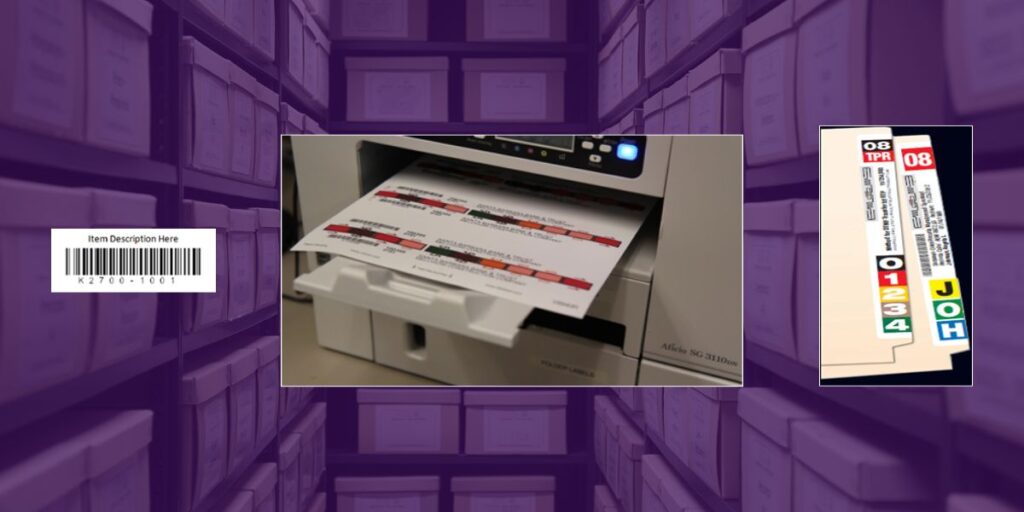
- Standard Barcode Labels: High-contrast black print labels that can be placed on the front of a folder for rapid identification.
- Color-Coded Labels: Using our patented “Innovative Filing System Innovation,” staff can color-code labels to match specific categories. These labels wrap around the top or side tab of a folder, providing a visual “misfile prevention” system that works in tandem with the digital barcode.
- Detailed Text Fields: Labels are not limited to codes. You can include critical metadata such as file descriptions, case numbers, or destruction dates, making the physical file as informative as its digital twin.
- Multi-Label Support: IoTFileTracker enables the printing of one or multiple labels per folder. This allows for redundancy—for example, placing one label on the side tab for shelf-based identification and another on the front for easy reading during desk-side use.
Mastering the Archive: Box and Folder Relationships
As records transition from active use to long-term storage, the complexity of tracking increases. IoTFileTracker excels in managing these “parent-child” relationships, specifically when folders are transferred into archive boxes.
When files are ready for archival, the software enables the printing of specialized Archive Box Labels. While some organizations use labels from box storage companies, printing directly from IoTFileTracker fully integrates the box’s digital identity with your internal tracking workflows.
During the archiving process, staff can use USB scanners to “nest” file folders into specific archive boxes. By scanning the folder label and then the box label, the software creates a permanent link. This ensures that when staff need a specific document years later, they can quickly locate it.
Empowering the Chain-of-Custody
The barcode labels printed from IoTFileTracker serve as the primary interface for every tracking action throughout the document’s lifecycle. These labels are fully compatible with our entire range of hardware:
- USB Scanners: Used at desks and service counters for rapid check-in and check-out, ensuring a reliable auditable chain-of-custody as files move between staff.
- Portable Barcode Scanners: These mobile units read both folder and archive box labels. They enable staff to perform Inventory in Seconds or complete full system audits. Whether the file is in a filing cabinet, on a desk, or deep within an archive, the portable scanner captures the data. The scanner then synchronizes the captured data with the central IoTFileTracker hub.
Scalability and the Path to RFID
While barcode labeling provides an incredible foundation for accuracy and accountability, IoTFileTracker builds for the future. Our platform allows organizations to easily and affordably upgrade from barcoding to RFID (radio wave) technology.
The same software platform that manages your barcode printing can transition to printing RFID-enabled labels. This upgrade enables “transcendent file management automation,” allowing staff to detect files all at once from up to 25 feet without needing line-of-sight scanning. By starting with a disciplined barcode labeling strategy, you are building the physical and digital infrastructure necessary for total automation.
Conclusion: Built for Scale, Built for Security
With over 40 years of successful, proven experience, IoTFileTracker builds world-class filing systems focused on every detail. Our labeling capabilities combine ease of learning and use with the robustness to meet the requirements of high-profile government and commercial organizations worldwide.
By utilizing IoTFileTracker for your label printing and archive management, you eliminate the risks of custom development and ensure that your organization maintains Total File Management Visibility. Your files remain tagged, tracked, and always accessible—protecting your productivity and your bottom line.