In the world of enterprise records management, the physical label is the bridge between a tangible document and its digital presence. Whether an organization is managing a few thousand legal briefs or millions of government case files, the integrity of the entire file tracking system depends on how these labels are generated, indexed, and applied.
Traditional, manual labeling methods—where employees type into word processors or use handheld label makers—create a “data silo” problem. These methods lack standardization, leading to inconsistent naming conventions, misplaced files, and compliance vulnerabilities. To solve this, sophisticated organizations are moving toward IoTFileTracker printing systems integrated directly within their records management platforms.
By using IoTFileTracker, organizations can transform the labeling process from a clerical chore into a centralized and automated system. This system powers RFID file tracking, strengthens audit readiness, and improves overall operational efficiency.
What Is a IoTFileTracker Printing System?
A IoTFileTracker printing system is a software-driven framework that centralizes the design, data entry, and generation of file labels within a single database. Instead of a standalone “label maker” application, the labeling function is a core feature of the records management software.
In the context of IoTFileTracker, a “IoTFileTracker” exists as a digital template. Before printing any physical label, the platform validates every data point—from the file name to the RFID document tracking ID—against the master database. This ensures that the physical label is an exact, high-fidelity mirror of the digital record.
Why Standardization Matters in File Folder Labeling
Inconsistency is the enemy of efficiency. Without standardized file labeling, a records room quickly descends into chaos. If one clerk labels a file “Smith, John” and another labels a similar record “J. Smith,” the ability to search, retrieve, and audit those files is severely compromised.
Risks of Inconsistent Labels
- Retrieval Failures: Employees spend hours searching for records that staff “mis-indexed” at the point of creation.
- Audit Gaps: Compliance officers cannot verify the chain of custody if the file identifier on the label does not match the database.
- Regulatory Non-Compliance: In sectors like healthcare or government, failing to follow a standardized naming convention can result in significant fines and legal liabilities.
IoTFileTracker eliminates these risks by enforcing a uniform indexing schema. By standardizing the “look and feel” of every label, organizations ensure that any staff member can walk into a file room and immediately understand the filing logic.
Key Features of IoTFileTracker Printing in IoTFileTracker
The strength of IoTFileTracker lies in its ability to control data entry at the source. The IoTFileTracker interface prevents “dirty data” from entering the system.
Controlled Data Entry Formats
To ensure accuracy, the software utilizes structured input fields:
- Drop-down Menus: Ensure users select department names, document types, and retention codes from a pre-approved list.
- Calendar Pickers: Standardize date formats (e.g., YYYY-MM-DD) to prevent confusion between international and domestic date styles.
- Required Fields: The system prevents label printing until users enter all critical information, such as a unique File ID or Account Number.
- Checkboxes and Radio Buttons: Allow for quick classification of file status (e.g., “Active” vs. “Archived”) without manual typing errors.
Ensuring Consistency Across All File Labels
A file folder labeling software must do more than just print text; it must manage the physical layout of the information. IoTFileTracker ensures that every label follows a rigid template:
- Uniform Field Placement: The system always places the File ID in the top right, centers the barcode, and aligns the color-coding blocks perfectly.
- Consistent Formatting: Font sizes, weights, and styles are locked. This consistency is not just for aesthetics; it allows the human eye to scan rows of folders much faster, reducing the cognitive load on staff.
Combining Text, Barcodes, RFID, and Color-Coding
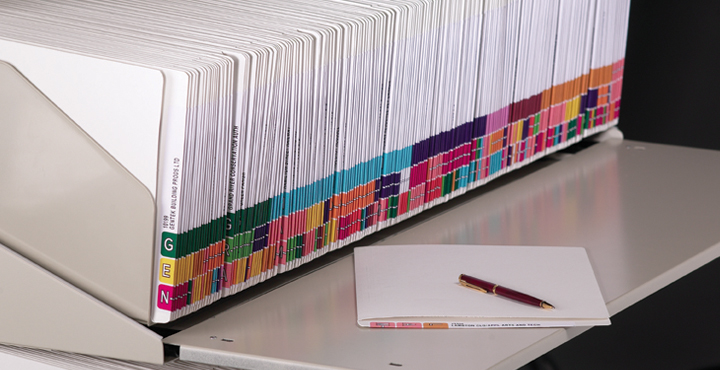
The most effective labels are “hybrid” assets. IoTFileTracker excels at generating multi-modal labels that support every layer of your file tracking system.
The All-In-One Advantage
- Human-Readable Text: Clear, bold text for manual identification.
- Color-Coding: Alpha or numeric color blocks for instant visual error detection and “misfile” prevention.
- Barcodes: High-resolution 1D or 2D barcodes for traditional line-of-sight scanning.
- RFID Technology: An embedded RFID chip for non-line-of-sight, automated IoT file tracking.
By combining these four elements into a single IoTFileTracker template, IoTFileTracker makes every file trackable in any environment—whether a handheld RFID reader scans it or a clerk visually identifies it on a high-density shelf.
Printing Options Supported by IoTFileTracker
Flexibility is essential in diverse operational environments. IoTFileTracker is hardware-agnostic, supporting multiple printing workflows:
Sheeted Labels (Standard Office Printers)
For organizations that prefer to use their existing laser or inkjet printers, IoTFileTracker generates sheets of labels. This is often the preferred method for color-coded systems where specialized paper stock is used.
Roll Labels (Thermal RFID Printers)
For high-volume, industrial environments, the system supports thermal RFID thermal printers. These printers enable high-speed “print-and-encode” workflows, generating labels on a continuous roll—ideal for large-scale backfile conversions or busy file intake centers.
RFID Encoding vs. RFID Commissioning
One of the unique advantages of using IoTFileTracker for your labeling needs is its sophisticated handling of the “Digital Handshake.”
- RFID Encoding: This occurs when a thermal printer writes the File ID directly to the RFID chip as it prints.
- RFID Commissioning: This is the process of linking a pre-printed RFID tag to a file record in the database.
IoTFileTracker manages both. If you are using sheeted labels, the software guides the user through a rapid commissioning process—scanning the barcode and then the RFID chip—to ensure a 1:1 match. This ensures that file tracking for compliance is accurate from the very first second a file is created.
Operational Benefits of IoTFileTracker Printing system
Standardizing your labeling through IoTFileTracker delivers immediate ROI:
- Faster File Creation: By automatically pulling data from existing databases, the system cuts the time required to onboard a new record by up to 70%.
- Reduced Errors: Eliminating manual typing means eliminating the primary cause of lost or “ghost” files.
- Improved Chain-of-Custody: Because each label links directly to the database, the system logs every barcode or RFID scan as a verifiable transaction.
Industries That Benefit from IoTFileTracker Systems
Government Records Management
Agencies managing vital records, such as birth certificates or court files, rely on IoTFileTracker to maintain strict indexing standards across multiple departments.
Healthcare and Patient Files
Standardized labeling organizes patient charts using HIPAA-compliant identifiers, while RFID document tracking provides instant location updates during emergencies.
Legal and Compliance-Driven Organizations
Law firms use standardized labels to manage the massive volume of discovery documents, ensuring that every case binder is accounted for during trial preparation.
Enterprise Records and Archives
Large corporations use IoTFileTracker printing to accurately index boxes and folders before sending them to long-term off-site archives. This ensures consistent, reliable, and compliant records management.
Scalability and Future-Ready Records Management
As your organization grows, your filing needs will evolve. IoTFileTracker is designed for scalability. You can start with simple barcode labeling and, when ready, upgrade to RFID file tracking without changing your core database or re-labeling your entire archive.
Our “standard-first” approach to labeling means your records are prepared for future digital transformations. Whether you are moving toward a fully automated “smart room” with overhead RFID sensors or integrating with an Enterprise Resource Planning (ERP) system, your labels will already be the compliant, standardized assets you need.
Conclusion
A successful file tracking system relies not just on software, but on the consistency and accuracy of the labels applied to folders IoTFileTracker printing within the IoTFileTracker platform provides the standardization, automation, and security required to manage physical records in a digital age.
By centralizing the labeling process, organizations can eliminate misfiles, accelerate audits, and ensure that every document is a visible, trackable, and compliant asset.