In the sophisticated world of information governance, where digital and physical data must coexist, the humble file folder remains a primary vehicle for critical information. For government agencies, healthcare providers, and legal institutions, physical records are not just legacy assets—they are essential evidence, patient histories, and legal foundations. However, the efficiency of these assets is entirely dependent on one factor: file folder labeling and indexing.
Poorly labeled folders are more than an organizational nuisance; they represent a significant drain on enterprise productivity. When a records manager or an attorney cannot find a specific document, the “search cost” ripples through the organization, leading to missed deadlines, compromised patient care, or legal discovery failures. At TrackerIoT, we advocate for a standardized, technology-forward approach. By leveraging IoTFileTracker, organizations can transform their file registries into high-performance environments where records management best practices are enforced through every label printed.
Why Users Must Instantly Identify the Correct File
In a high-volume registry, the difference between a three-second retrieval and a three-minute search is profound. Physical records management relies on the ability of the human eye and machine sensors to work in tandem.
Impact on Productivity and Accuracy
When a staff member approaches a shelf containing thousands of folders, they must be able to identify the correct record with absolute certainty. If the indexing is vague or the labeling is inconsistent, the risk of pulling a “similar” but incorrect file increases. In a medical or legal setting, accessing the wrong file is not just a mistake—it is a compliance breach.
Risks to Compliance
File tracking for compliance begins with the label. If a record is pulled and the activity is not logged because the label was unreadable or the barcode was damaged, the chain of custody is broken. Standardized labeling ensures that every interaction with a file is accurate, identifiable, and auditable.
Challenges of Handwritten File Folder Indexing
Many legacy systems still rely on handwritten tabs or “Sharpie” indexing. While seemingly low-cost, this practice is one of the most expensive hidden costs in records management.
- Legibility Issues: One person’s handwriting may be another person’s puzzle. As staff members change over years or decades, handwritten folders become increasingly difficult to decipher.
- Inconsistent Formats: Without a software-driven template, some folders might be indexed “LastName, FirstName,” while others are indexed by “Case Number.” This inconsistency destroys the logic of the filing system.
- Operational Inefficiencies: Handwriting labels is time-consuming and prone to transcription errors. A single transposed digit in a case number can effectively “lose” a file for years.
Why Printed File Folder Labels Are Best Practice
Transitioning to printed file labels generated by IoTFileTracker is the first step toward professionalizing a file registry. Standardization is the enemy of error.
Consistency and Accuracy
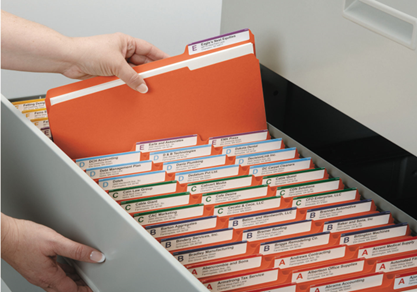
A digital file tracking system ensures that the data on the physical label is a 1:1 match with the data in the database. When a label is printed through IoTFileTracker, it pulls directly from the verified record, ensuring that naming conventions, dates, and identification numbers are perfectly consistent across the entire enterprise.
Improved User Confidence
When staff see a professional, standardized label, their confidence in the filing system increases. They are more likely to follow filing protocols and less likely to engage in “shadow filing” (keeping files at their desks because they don’t trust the file room).
What Information Should Be Included on File Folder Labels?
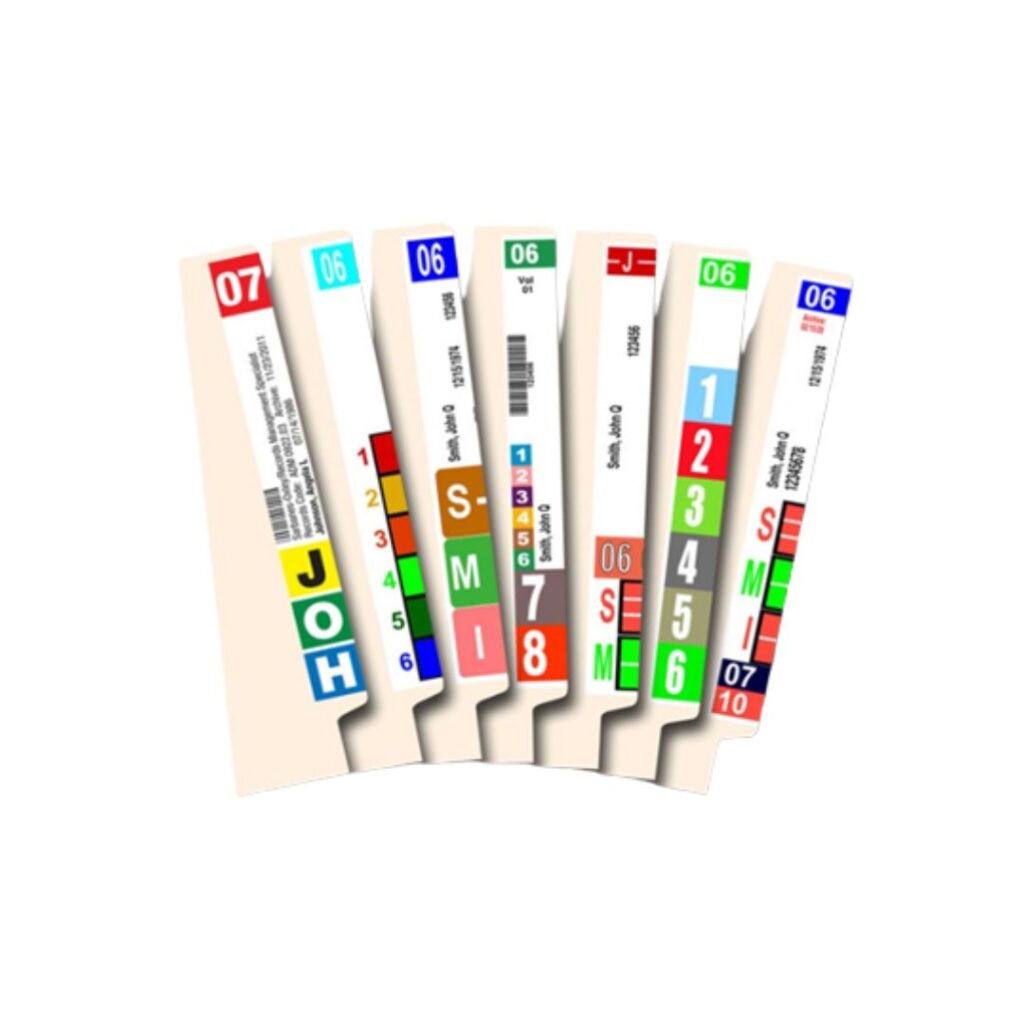
A well-designed label balances human readability with machine-scannable data. IoTFileTracker allows for fully customizable templates that generally include:
- Primary Index: The main identifier (e.g., Client Name or Patient ID) in large, bold text.
- Secondary Index: Sub-identifiers (e.g., Date of Birth or Case Type).
- Barcodes/RFID: For rapid, non-line-of-sight RFID file tracking.
- Color-Coding Blocks: Visual cues to prevent misfiles.
- Retention Dates: Helping staff identify when a file is eligible for destruction.
The Role of Color-Coding in File Folder Indexing
One of the most effective records management best practices is the implementation of color-coded filing systems. This methodology uses colors to represent specific characters or digits in the index.
Visual vs. Cognitive Filing
The human brain processes color significantly faster than it processes text. By using color-coded labels, a records manager can “scan” a shelf of 5,000 files and instantly spot a misfile because the color pattern will be broken. This “visual clash” acts as an immediate alarm, ensuring the integrity of the registry remains intact without requiring a manual folder-by-folder audit.
Top-Tab and Side-Tab File Folder Labeling
The physical orientation of your storage dictates your labeling strategy.
- Side-Tab (End-Tab) Labeling: Essential for open-shelf filing systems. By placing the label on the vertical edge, the index is visible from the aisle. This is the preferred method for high-density environments.
- Top-Tab Labeling: Common in traditional drawer-based filing. While less efficient than side-tab systems, IoTFileTracker can still manage these to improve accuracy within existing hardware.
Printing Multiple Labels per File Folder
For maximum visibility, some organizations utilize “multi-label” strategies. IoTFileTracker can generate sets of labels for a single folder:
- Side + Top: Ensuring the file is identifiable whether it is on an open shelf or temporarily placed in a desk drawer.
- Side + Front: The label allows easy identification of the folder when someone carries it or places it on a workstation.
This redundancy ensures that the file is never “anonymous,” regardless of its orientation.
Labeling Beyond File Folders: Documents and Archives
A comprehensive file tracking system shouldn’t stop at the folder level. IoTFileTracker supports:
- Document-Level Indexing: Applying small RFID tags to critical original documents within a folder (folio validation).
- Archive Binders and Boxes: Generating high-durability labels for long-term storage containers, ensuring that the contents of a box are as searchable as the files in the registry.
Supporting Multiple Label Sizes and Printers
Every filing environment has different needs. IoTFileTracker provides the flexibility to print on:
- Sheet Labels: Ideal for standard office laser/inkjet printers.
- Roll Labels: Best for high-volume thermal RFID file tracking printers.
This ensures that whether you are a small legal boutique or a massive government archive, the labeling workflow fits your operational reality.
How IoTFileTracker Enhances File Folder Labeling and Indexing
IoTFileTracker serves as the centralized “brain” of your records management operation. It doesn’t just print labels; it manages the entire lifecycle of the record.
- Standardized Creation: Enforce mandatory fields so no “blank” or incomplete labels can be printed.
- Integrated Tracking: The moment a label is printed, its barcode file tracking or RFID ID is live in the database.
- Location Visibility: As the folder moves from the printer to the shelf to a user’s desk, IoTFileTracker records every movement.
Productivity and Compliance Benefits
By modernizing your labeling and indexing through IoTFileTracker, you realize immediate ROI:
- Faster Retrieval: Reduce file-find time by up to 50% through color-coded visual cues.
- Fewer Misfiles: Eliminate the “ghost file” phenomenon that plagues manual systems.
- Audit Readiness: Provide a complete, time-stamped history of every file, from creation to destruction.
Industries That Benefit Most
- Government: Managing vital public records and land titles with absolute transparency.
- Healthcare: Ensuring patient charts are available at the point of care while maintaining HIPAA-compliant physical records management.
- Legal: Maintaining a perfect chain of custody for discovery materials and original contracts.
- Enterprise: Securing HR files, intellectual property, and financial records across multiple locations.
Conclusion
File folder labeling and indexing are the foundational architecture of any records management system. Without a clear, standardized, and technologically enabled labeling strategy, even the best software cannot provide total visibility.