
We discuss RFID file tracking and doorway sensors as the primary means of ensuring a record is found. However, once that folder is pulled from the shelf and placed on a desk, a second, equally critical challenge begins: finding the specific document needed within that folder.
An unorganized folder is a productivity bottleneck. When documents are loose, shuffled, or stacked chronologically without dividers, a simple retrieval task turns into a manual “page-flipping” exercise. Furthermore, unsecured documents pose a significant risk to physical records management and compliance. At TrackerIoT, we ensure rigorous internal folder organization supports an effective file tracking system. By utilizing file folder fasteners, partitions, and index dividers, organizations can transform their records from mere storage units into high-efficiency data assets.
Priorities of an Effective Filing System
A professional records management framework builds on three pillars of internal folder organization:
- Rapid File Access: The ability to find the folder on a shelf or in a registry instantly (aided by color-coding and RFID).
- Fast Document Retrieval: The ability to navigate to a specific document type inside the folder in seconds.
- Secure Containment: Ensuring that no document can fall out, be misplaced, or be removed without leaving a trace.
If staff fail to uphold any of these pillars, they compromise the integrity of the record. An RFID-tracked folder that lacks its core contract because staff did not use fasteners represents a governance failure.
Why Documents Must Be Secured Inside File Folders
In regulated industries like healthcare, government, and law, the “folio” or the collection of papers within a folder is a legal entity.
Preventing Document Loss
Staff can easily lose loose papers during transit. When staff move a folder between departments, pages can slide out or accidentally slip into a neighboring file. By securing documents with fasteners, you create a permanent, chronological record that stays intact regardless of how many hands it passes through.
Maintaining Chain-of-Custody Integrity
Total document access productivity requires that the internal sequence of a file remains consistent. When auditors review a folder, the document order often tells the story of the transaction. Fasteners preserve this narrative, help staff maintain compliance, and reduce the risk of document tampering.
File Folder Fasteners Explained
The most basic yet essential tool for internal security is the fastener. These are typically factory-installed on the inside covers or partitions of a folder.
- Standard Metal Fasteners: Usually 2-hole (top-mounted) or 3-hole (side-mounted), these hold documents in place using a compressor bar and two flexible prongs. They are the standard for maintaining chronological order.
- Extension Clip Fasteners: This is a best-practice upgrade for high-volume folders. An extension clip allows the user to open the file to a specific page and remove it or photocopy it without having to unthread all the documents on top of it.
Improving Document Access with Extension Clips
In traditional fasteners, adding a new document to the middle of a stack is a labor-intensive process. Extension clips allow the documents to “glide” along a rail, providing easy access to any page. This reduces handling time and prevents the “tearing” of paper holes that often occurs with standard metal prongs.
Organizing Multiple Document Types Within a Folder
Complex files—such as HR records, mortgage applications, or litigation binders—contain many different types of documents. Placing them all on a single fastener creates a “needle in a haystack” scenario.
IoTFileTracker works best when physical files are logically grouped. For example, a legal file might be grouped by:
- Correspondence
- Pleadings
- Evidence
- Invoices
By grouping these types, you reduce the time staff spend searching, which directly correlates to higher file registry efficiency.
Partition File Folders
For the ultimate in organized physical records management, many organizations utilize partition file folders (also known as classification folders). These folders contain internal “flaps” or partitions made of heavy-duty pressboard, each equipped with its own set of fasteners.
A single folder can have 2, 4, or 6 “filing surfaces.” This allows a records manager to separate different categories of information physically. When a clerk needs a specific lab result in a medical chart, they know exactly which partition to turn to, rather than searching through the entire record.
Index Dividers and Color-Coded Tabs
While partitions provide physical separation, index dividers provide visual navigation. These are heavy-duty cardstock sheets with tabs that protrude from the side or bottom of the document stack.
Visual Organization vs. Cognitive Searching
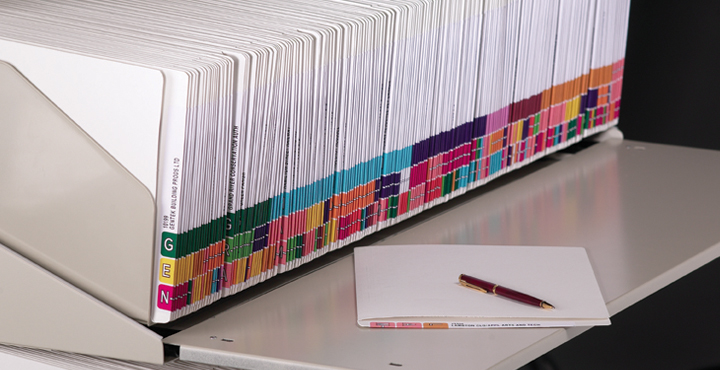
Using pre-printed tabs (e.g., “Performance Reviews,” “Disciplinary,” “Benefits”) allows for “visual navigation.” Instead of reading every page to identify the document, the user simply looks for the specific tab. Color-coding these tabs to match the IoTFileTracker labeling schema doubles the retrieval speed.
Common Folder Use Cases: The Personnel File
Consider a standard HR personnel file. Without internal organization, it is a mess of 100+ pages. Following records management best practices, organize it into a partition folder:
- Partition 1: Application and Resume.
- Partition 2: Tax and Payroll forms.
- Partition 3: Performance Reviews and Disciplinary records.
- Partition 4: Benefits and Insurance documents.
By securing these with fasteners, the HR manager can confidently track the file using IoTFileTracker and know that when they open the folder, the information is exactly where it belongs.
Pockets and Special Media Enclosures
Not all records are 8.5″ x 11″ paper. Many files must contain:
- Digital media (CDs, USB drives)
- Photographs
- Original small-format certificates (birth certificates, ID cards)
Specialty pockets and enclosures can be adhered to the inside of the folder. These protect loose materials that cannot be hole-punched while keeping them inextricably linked to the parent folder and its RFID file tracking identity.
How Better Internal Folder Organization Improves File Tracking
There is a symbiotic relationship between internal organization and digital tracking.
- Faster Document Verification: Tabbed and fastened documents allow a records manager to quickly verify the presence of critical documents during an audit.
- Improved Accountability: Fastening documents makes it much harder for a page to “accidentally” go missing.
How IoTFileTracker Complements Well-Organized File Folders
IoTFileTracker is the digital layer that makes these organized physical assets visible to the entire enterprise.
- Tracking Folder Location: While the partitions organize the inside, IoTFileTracker ensures you know where the folder is in the building.
- Supporting Audits: Staff can configure the software to remind them to perform “folder integrity checks” and verify that fasteners and dividers remain in good repair.
- Reducing Lost Time: When staff organize and track a file properly, they reduce the “Total time to information” to the absolute minimum.
Industries That Benefit Most
- Government: Managing massive public record archives where document sequence is a matter of law.
- Healthcare: Organize patient charts to ensure clinical safety and HIPAA compliance.
- Legal: Maintaining discovery binders and original evidence where the chain of custody is paramount.
- Enterprise HR: Protecting employee privacy and ensuring audit readiness for labor board inspections.
Conclusion
File folder fasteners, partitions, and index dividers are the unsung heroes of records management. While the file tracking system provides the map to find the folder, internal organization provides the index to find the data.